NCDOT runs the largest prioritization exercise in the state on PublicInput. Here is how the STIP map and survey were built from feature layers NCDOT already had, and how every comment comes back matched to a project.
Looking for the engagement and Budget Simulator story? Read the NCDOT STIP case study.
A State Transportation Improvement Program, or STIP, is the multi-year list of transportation projects a state DOT plans to fund. STIP public involvement is the comment period where residents weigh in on that list. A STIP map lets people find the projects near them; a STIP survey captures whether each one should be a priority and why.
A STIP covers thousands of projects across every county. Before NCDOT centralized on PublicInput, information went out through press releases, PDFs, and GIS viewers, and comments came back by email, voicemail, and public meetings. Staff matched each one to a project by hand and pasted it into a spreadsheet for the divisions.
The engagement is built from the same ArcGIS Online feature layers the department maintains for its partners. The import tool handles the common feature-layer formats, so setup is a matter of pointing at the data and telling the tool what each field means.
Point the import tool at the STIP project layer in ArcGIS Online. Points, lines, and polygons come in with all their attributes.
Provide divisions, MPO and RPO areas, or any other boundary as a KML file or an ArcGIS feature layer. Projects and comments are later cross-referenced to these boundaries so each team can see what is in its region.
The import reads the layer's fields and proposes an identifier and a category. Each field you show on the card gets a format: Text, Number, Money, or Long note. Cost fields are recognized by name, and you say whether dollars are stored as whole dollars, thousands, or millions.
Pick the field that holds project type. Each value becomes a tag on the map that residents can filter by.
Residents vote and comment on projects directly on the map. Public meetings and hearings are scheduled on the same site and recorded, and those recordings feed comment capture and matching.
The import reads the layer's schema, proposes an identifier and a category, and guesses a format for each field from its name and sample values. You untick what residents shouldn't see, rename labels, and set how dollar amounts are stored. Money fields render as $850K, $4.5M, or $1.2B, with a live preview as you change the setting. Scores can come from the layer or from a spreadsheet joined on the identifier, and can be re-uploaded mid-project without a developer.
| Layer field | Role in PublicInput | Format | What residents see |
|---|---|---|---|
| SPOT_ID | Project identifier | Text, unique per project | H170394 |
| PROJECT_TITLE | Title | Text | US 64 (Rosman Highway, S Broad Street) |
| DESCRIPTION | Description | Long note | RAB at US 64 BUS and N. Country Club Rd |
| MODE | Category | Text, low cardinality | Legend entry and map icon: Highway |
| TOTAL_COST | Shown on card | Money, stored in thousands | 18500 → $18.5M |
| REG_IMPACT_SCORE | Score, joined by ID | Number | 37.9 |
| DIV_NEEDS_SCORE | Score, joined by ID | Number | 28.14 |
| FROM_LIMIT / TO_LIMIT | Shown on card | Text | US 64 BUS (S Caldwell St) → N Country Club Rd |
| SHAPE | Geometry | Point or line | Drawn on the map, colored by category |
Agencies store costs differently. NCDOT publishes project cost in thousands. Other layers use whole dollars or millions. The wizard asks once how the field is stored, then every amount scales to the right magnitude on its own: dollars, $K, $M, or $B, whichever fits the number. A live preview under the setting shows a real value from the layer, so a wrong unit is obvious before publishing.
| Stored value | Unit setting | Shown to residents |
|---|---|---|
| 850 | whole dollars | $850 |
| 42,500 | whole dollars | $43K |
| 5,359 | thousands | $5.4M |
| 18,500 | thousands | $18.5M |
| 1.2 | millions | $1.2M |
| 2,400 | millions | $2.4B |
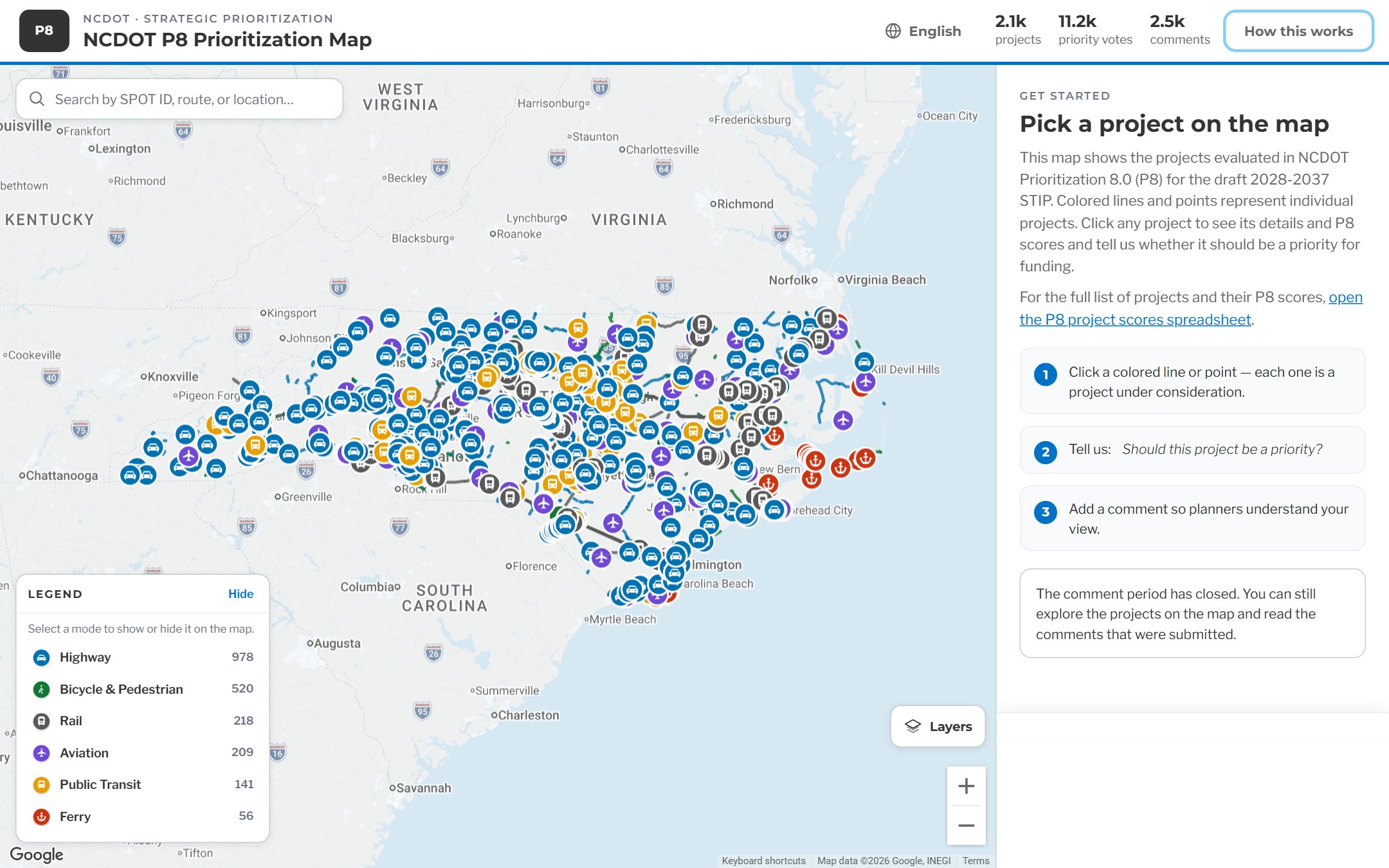
Screenshots from NCDOT's P8 Prioritization Map for the draft 2028–2037 STIP. Every project, score, and legend entry on it came from the feature layer and the field configuration above.
The legend comes from the mode field: Highway, Bicycle and Pedestrian, Rail, Aviation, Public Transit, and Ferry, with a count for each. Residents can hide a mode, search by SPOT ID, route, or place, or just click a point or line. The sidebar walks them through the ask: pick a project, say whether it should be a priority, add a comment.
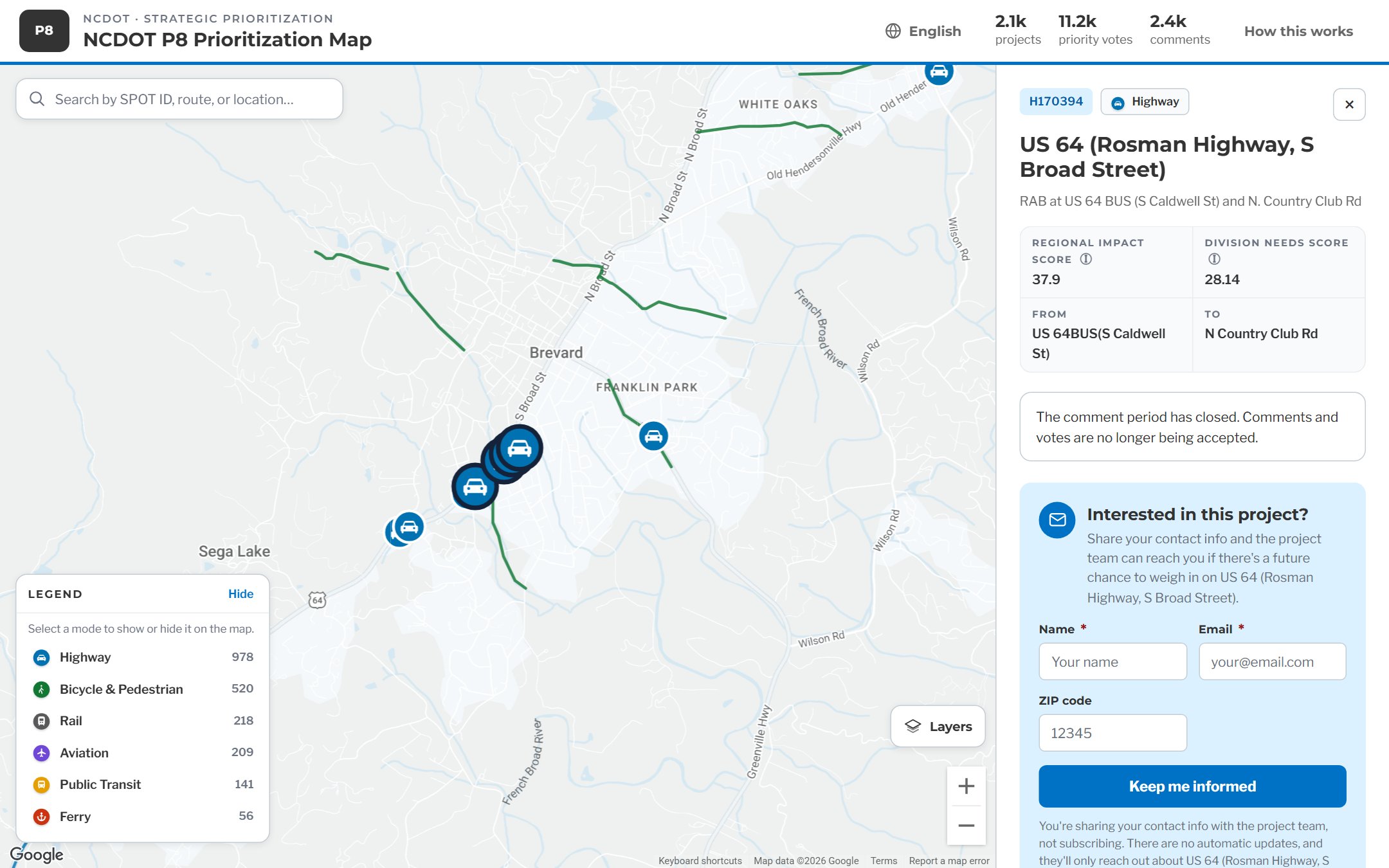
Clicking a project opens the fields you chose to show: SPOT ID, mode, title, description, Regional Impact and Division Needs scores, and the from and to limits. Nothing was retyped. The vote and comment prompts sit right below, so a comment left here is already tied to this SPOT ID.
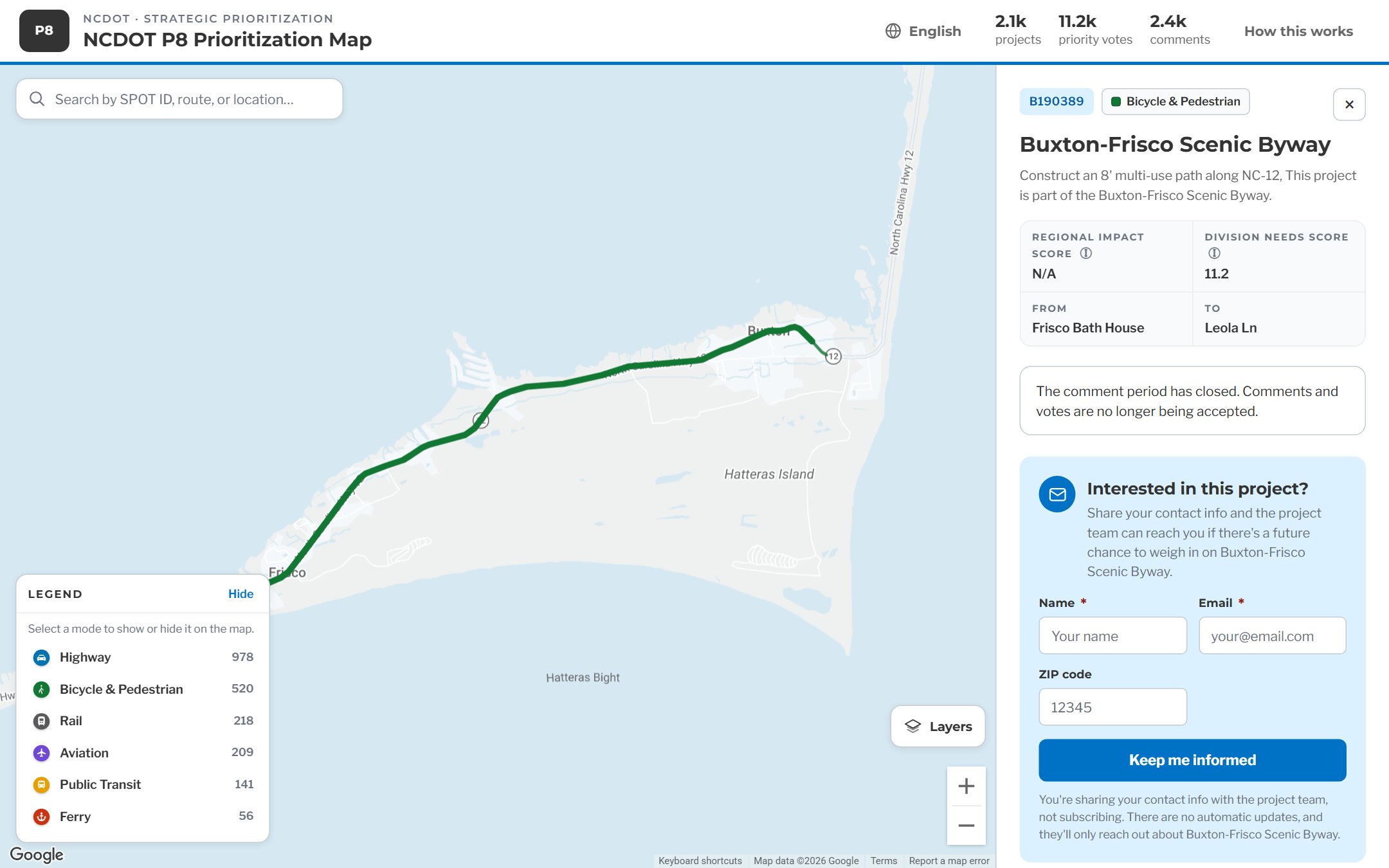
A bicycle and pedestrian project on NC-12 shows up as the line geometry NCDOT already maintains, with the same card. When the comment period closes, the map stays up so residents can keep exploring projects and reading what was submitted.
Two kinds of comments come in. Map comments already know their project. Hearing comments don't, so the module works out the best match and shows its confidence, and an admin makes the final call.
A resident clicks a project and leaves a comment. It is tied to that project's SPOT ID the moment it's submitted. Nothing to sort.
Comments captured from a recorded meeting don't carry a project ID. The module looks at where the hearing was held, where the speaker lives if known, keywords in what they said, and any other clues that point to a project. It proposes a best-match project and states how confident it is.
High-confidence matches can be accepted quickly, one after another. Lower-confidence matches are where staff slow down and check that the right project is attached. Either way, the person stays in control of the record.
Divisions have days, not weeks, to fold public input into point assignment. Reading a thousand comments in a spreadsheet does not fit in that window. A report scoped to your own division, with projects ranked by support and the comments underneath, does.
| ID | Div | MPO | Comment | Source | Assigned | Status | Notes | Prior yr |
|---|---|---|---|---|---|---|---|---|
| H.01221 | 04 | CAMPO | Widen US-64 at exit 20, backs up daily | ? | open | ask D.N. | 2024 | |
| ? | 04? | tired of the railroad ties piled up | hearing | open | which road? | |||
| B.00987 | 04 | Please add bike lane on Church St | map | PM left | open | fwd again | 2023 | |
| H.01221 | 04 | CAMPO | Same as above, mayor also asked | hearing | ? | open | dup? | |
| H.01102 | 04 | CAMPO | Bridge is fine, spend it elsewhere | map | open | |||
| ? | ? | voicemail 2:14 - garbled | phone | open | call back | |||
| H.00432 | 07 | Roundabout at Elm and 5th | open | 2022 | ||||
| H.01221 | 04 | CAMPO | Widen US-64, senator letter attached | ? | open | link 3 rows |
One tab per division. Duplicates linked by hand. Sorting is the review process.
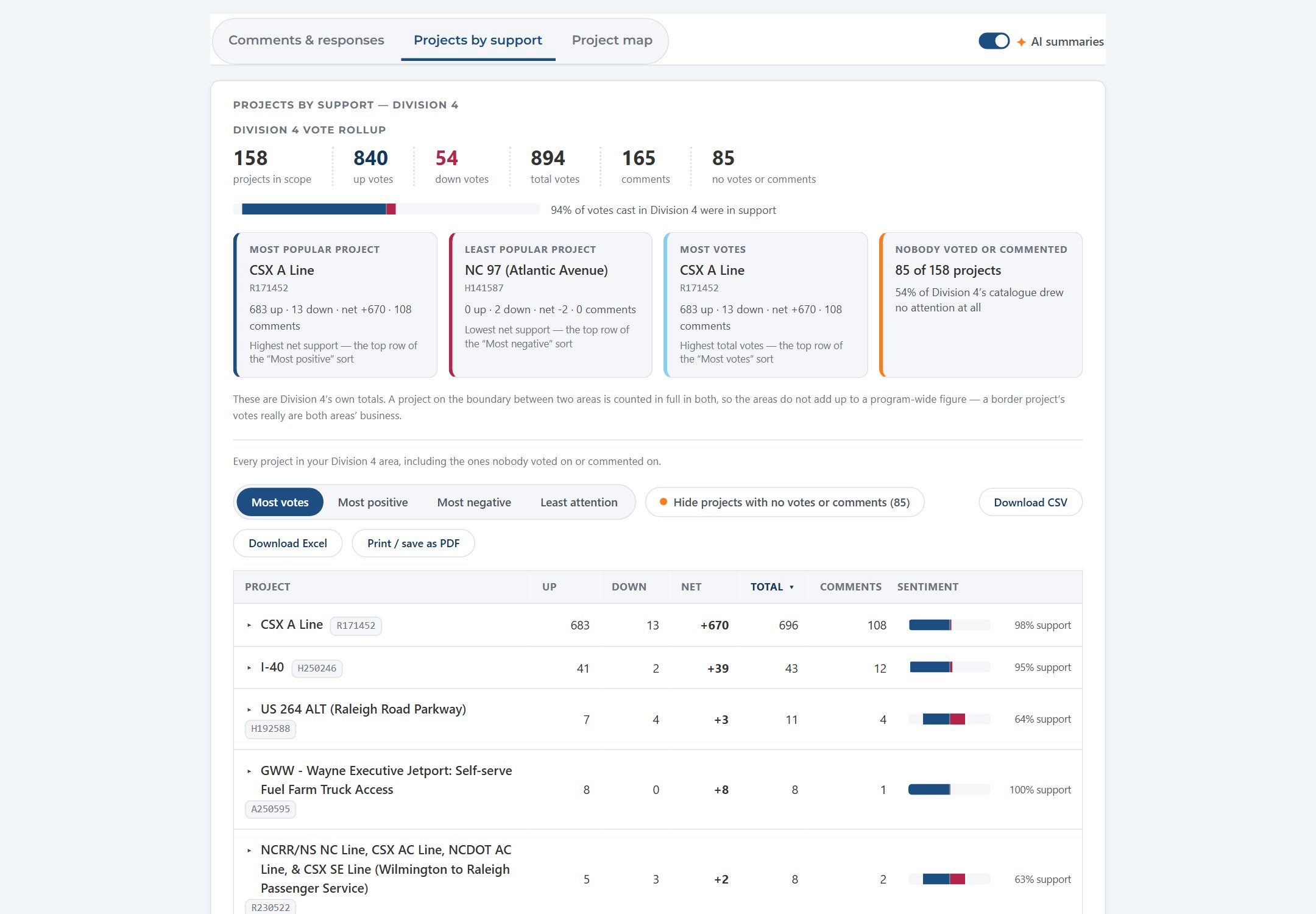
NCDOT's P8 stakeholder report, filtered to Division 4. Every project in the division ranked by votes, with net support, comment counts, and a sentiment bar. Sort by most positive, most negative, or least attention. Hide the projects nobody touched. Export the rows when someone needs them.
The same report serves the whole program. A "Viewing" selector switches between statewide and any of the 53 divisions, MPOs, and RPOs, and every number, chart, and list on the page re-scopes to that area. Comments, projects, and votes are cross-referenced to the boundary layers from setup, so a project on a boundary counts for both areas that share it.
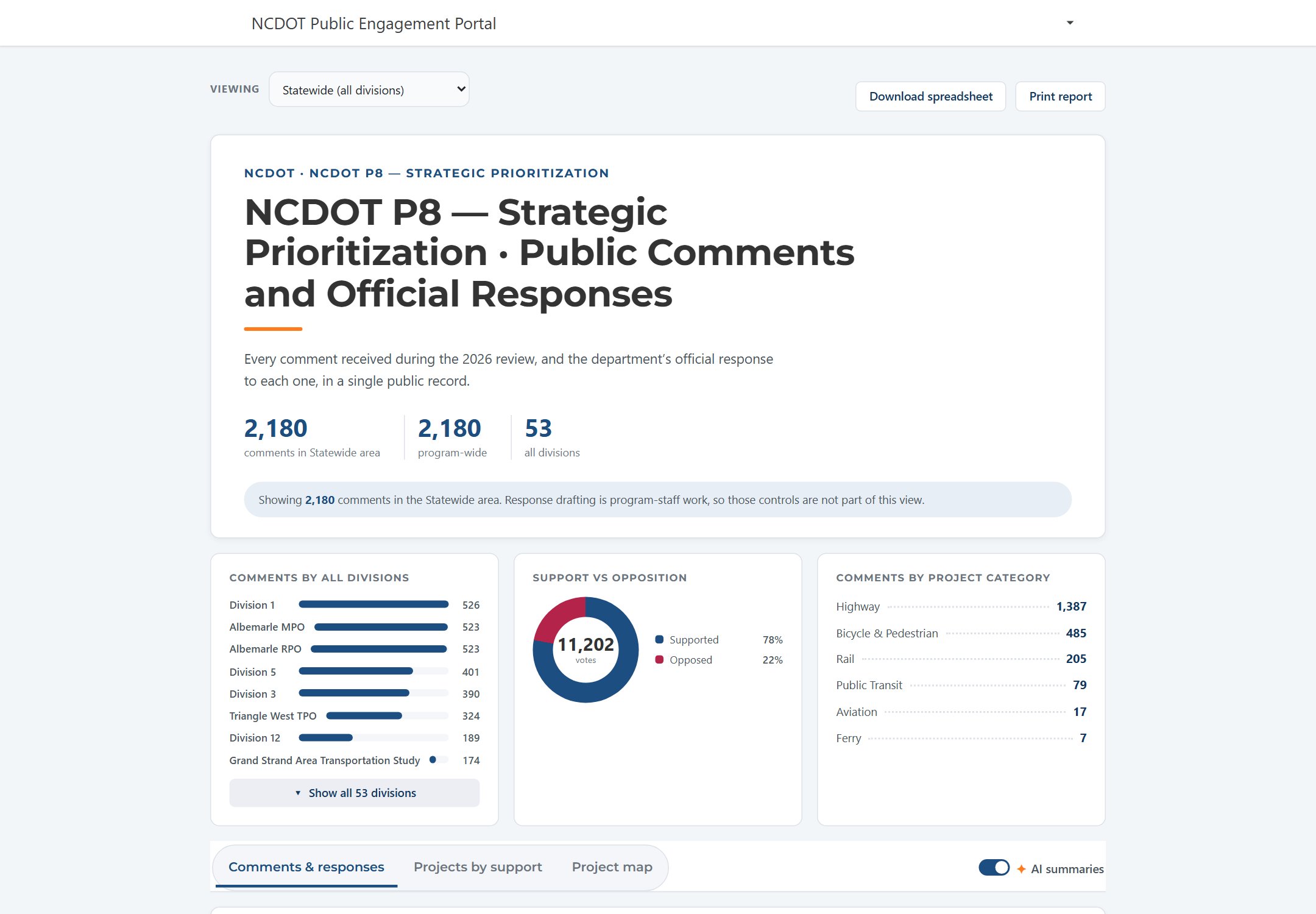
Total comments, comments by division and planning organization, support versus opposition across all votes, and comments by project category. Download the spreadsheet or print the report from the top bar. Tabs below switch between comments and responses, projects by support, and the project map, with AI summaries toggled on.
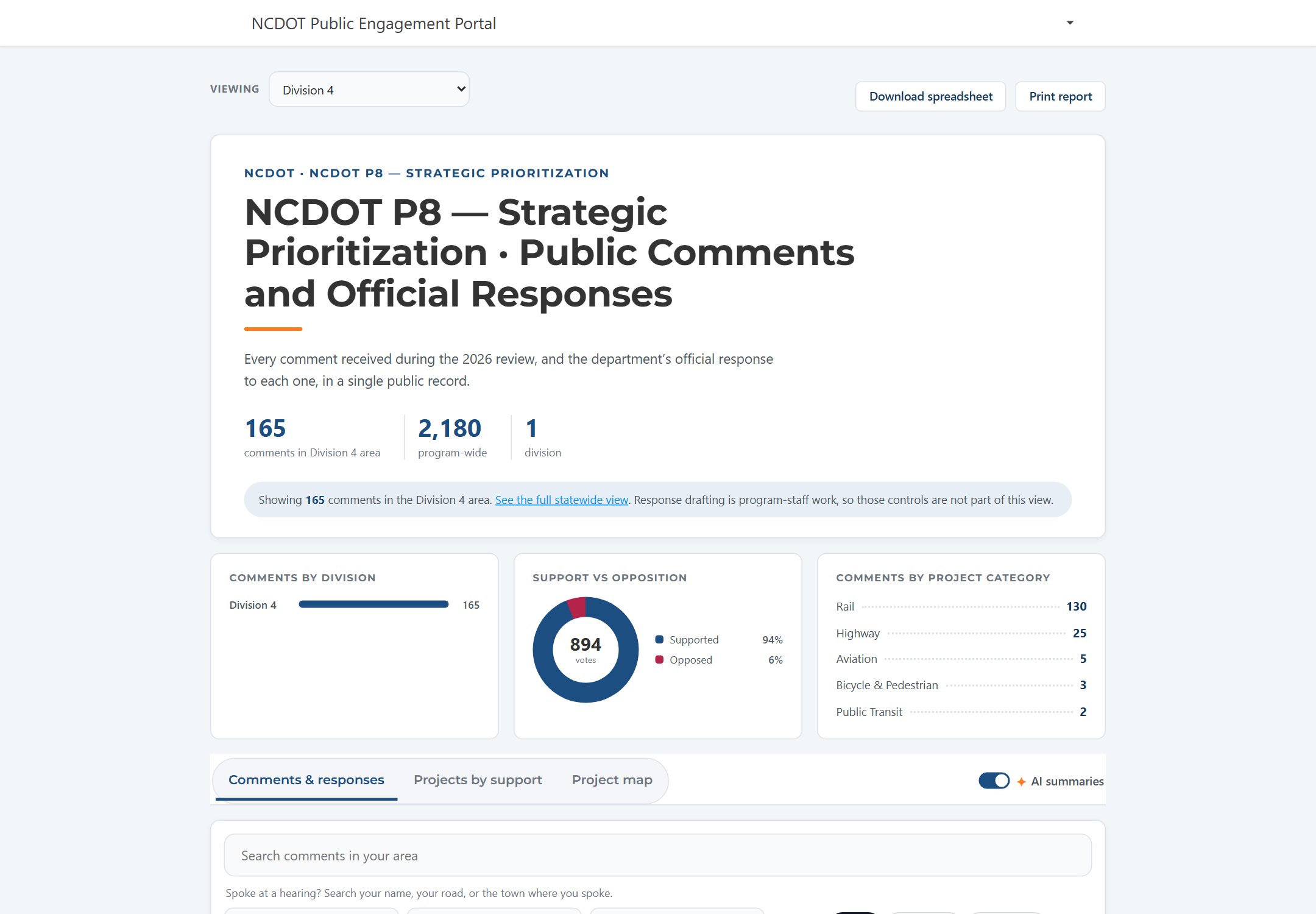
Pick a division, MPO, or RPO and the report becomes theirs: their comment count against the program total, their support split, their category mix. Below it, comments can be searched by name, road, or town, filtered by project or response status, and grouped by project, by speaker, or rolled up by legislative district for elected officials.
English and Spanish, an interactive project map, searchable project pages, and three funding tiers explained in plain language. Results as published in the NCDOT STIP case study.
A project feature layer and a set of boundaries, as KML or a feature layer, are enough to stand up a STIP, TIP, or priority-program engagement. Comments are matched to projects as they come in, and each division gets a summary it can act on.